
Appearance
Context Engine & Realms
The Context Engine is the core data structure in Agentcy. Every entity a connector discovers — a GitHub repo, an EC2 instance, a Kubernetes pod, a Salesforce account, a Figma file — becomes a node. Relationships between them become edges. Queries — whether KQL/SQL, semantic search, or agent tool calls — read the same engine.
Explore: see your context
The fastest way to understand the engine is to look at it. The Explore page is a Kibana-style workspace over your knowledge graph: a hero canvas of nodes-and-edges, full-text search with facet filters, structured-query editor with autocomplete, and a pipelines view. It's the single place to inspect what's been ingested and ask questions of it.
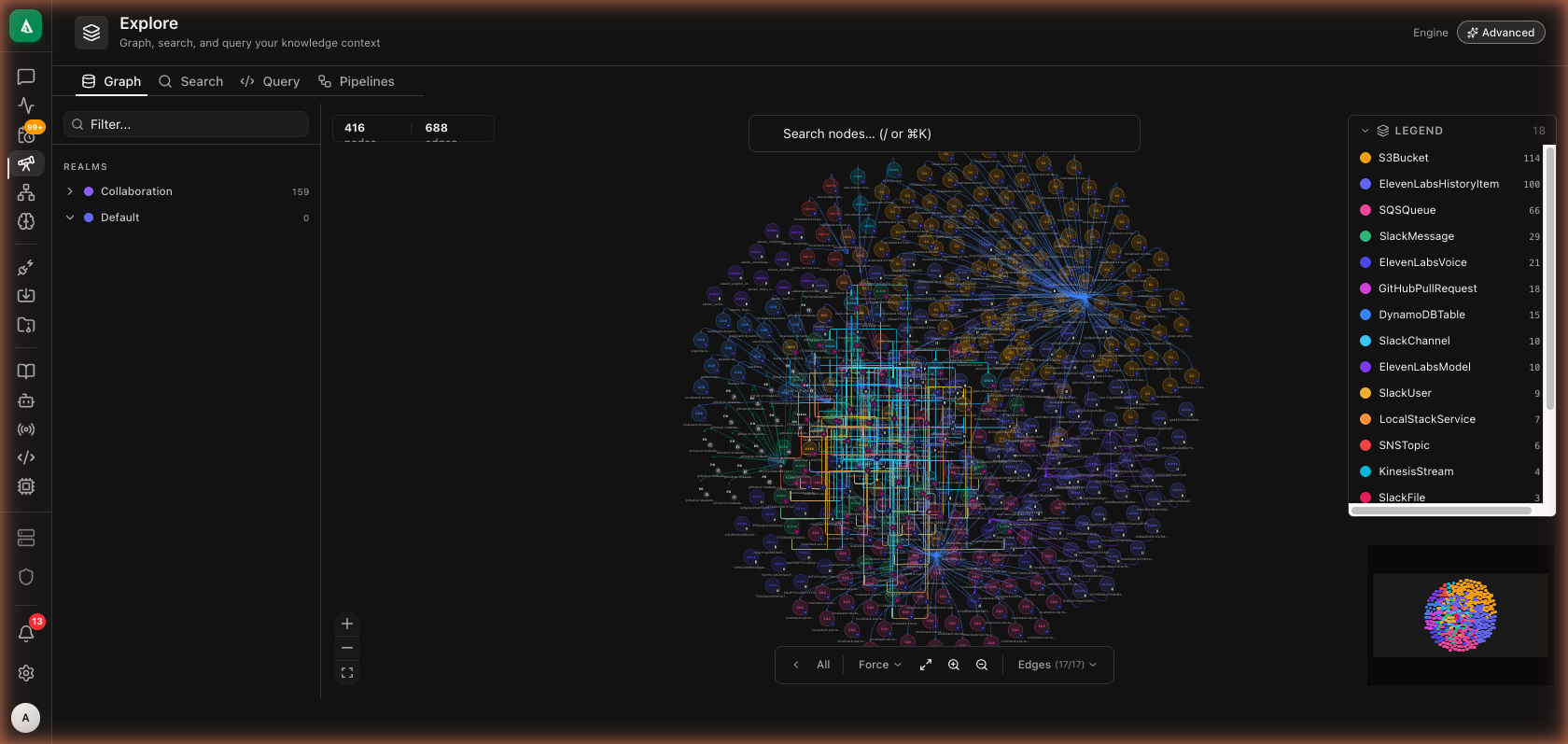
The Graph tab renders a force-layout view of the active realm. Colors map to labels (legend, top-right) and the per-label counts show distribution at a glance. Clicking a node opens a detail panel with properties, metadata, and one-click drill into its 1-hop neighborhood.
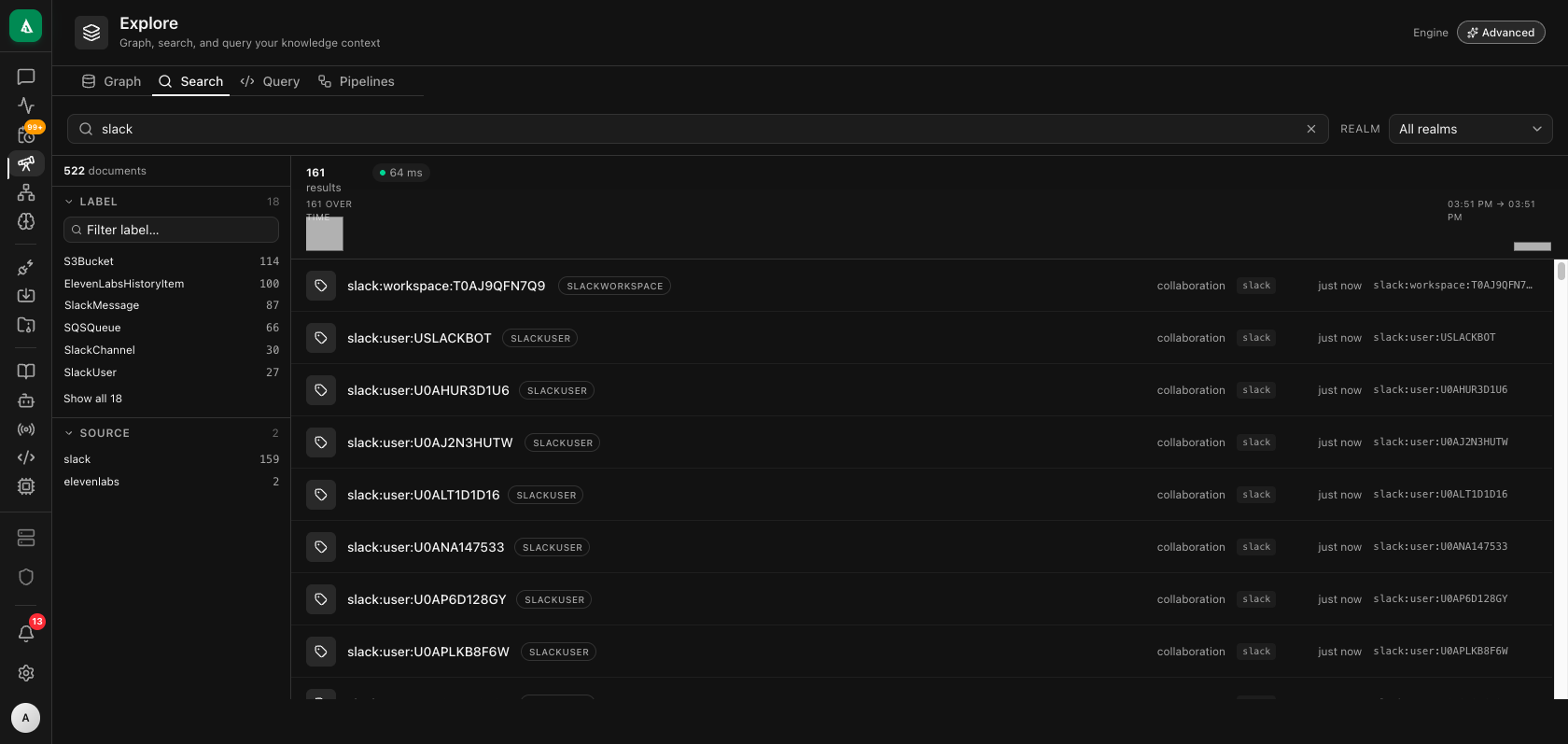
The Search tab is full-text + facet filtering across the whole graph. Type at least two characters; results stream in case-insensitive. The left sidebar facets by Label and Source; the histogram strip shows time-distribution of matches.
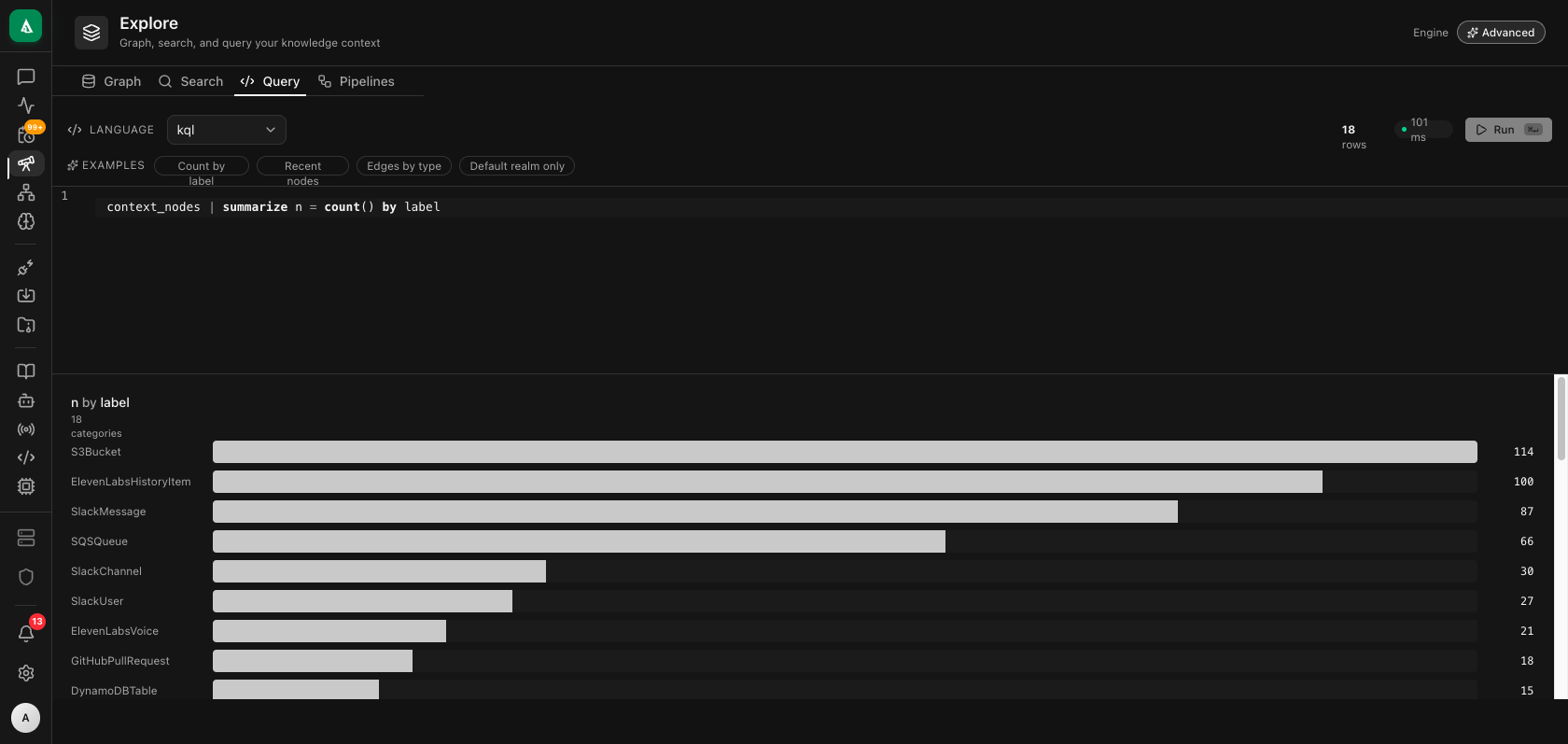
The Query tab is a structured-query editor (KQL on Advanced; Cypher on Basic) with schema-aware autocomplete. Common shapes (summarize ... by, time-series) get auto-rendered as charts above the result table.
Two engines: Basic and Advanced
The engine is pluggable. Two providers ship with the platform:
| Provider | Backed by | When to use |
|---|---|---|
| Basic | Embedded graph store (Neo4j-compatible) | Self-hosted starter installs, dev environments, or any deployment where you want zero external dependencies. Default for new self-hosted installs. |
| Advanced | Columnar engine (kyma) + S3-compatible object store + pgvector | Available on Agentcy Cloud and on-premise Enterprise deployments. Required for: structured KQL/SQL, time-series queries, schema evolution, multi-billion-node scale, native Apache Arrow output. |
Both providers expose the same ContextEngine trait. Application code, agent tools, and the Explore UI work against either — the engine selection is opaque to callers, surfaced only via a Capabilities descriptor (which query languages are available, whether vector search is online, etc.).
| Capability | Basic | Advanced |
|---|---|---|
| Graph traversal | ✅ | ✅ |
| Keyword search | ✅ | ✅ |
| Vector / semantic | ✅ | ✅ (HNSW via pgvector) |
| Structured Cypher | ✅ | ❌ |
| Structured KQL | ❌ | ✅ |
| Structured SQL | ❌ | ✅ |
| Time-series | ❌ | ✅ |
| Schema evolution | ❌ | ✅ |
| Bulk ingest throughput | OK | High |
The frontend reads /api/v1/context/capabilities once and adapts: the Query tab shows Cypher on Basic, KQL/SQL on Advanced; the agent tool catalog injects the appropriate query-language hints into the LLM prompt; the Settings → Context Engine page hides switch options unavailable on the deployment.
How to enable Advanced
Advanced ships configured on Agentcy Cloud and on Enterprise on-prem deployments. To enable it on a self-hosted install:
bash
# Required
export CONTEXT_ENGINE=advanced
export KYMA_BASE_URL=http://kyma:8080
export KYMA_TOKEN=...
export KYMA_DATABASE=kyma

# Optional — semantic search via pgvector. Falls back to Basic vector index if unset.
export EMBEDDINGS_DATABASE_URL=postgresql://postgres:...@postgres:5432/kymaProvision the kyma sidecar + S3-compatible object store via the project's docker-compose --profile context_advanced up -d (development) or via the agentcy-cloud-api provisioner (Cloud customer instances).
When CONTEXT_ENGINE is unset the engine factory boots Basic. No data migration is required to switch to Advanced — the migration worker (Settings → Context Engine → "Switch to Advanced") backfills the existing Basic data into kyma in the background.
Nodes and relationships
Nodes carry labels (like Repository, Service, Incident) and properties (like name, url, created_at). Edges are directed and typed.
Typical shape:
(:Repository {name:"monolith"})-[:HAS_PR]->(:PullRequest {number:412})
(:Service {name:"checkout"})-[:DEPLOYED_ON]->(:Cluster {name:"prod-us"})
(:User {email:"alice@…"})-[:OWNS]->(:Repository)
(:Incident {id:"INC-42"})-[:AFFECTS]->(:Service)You don't need a schema up front — both providers are schema-flexible and new node/edge types appear organically as connectors evolve. On Basic, idempotent constraints are applied at first-write for the properties that should be unique (source_id, realm, canonical URLs). On Advanced, kyma's columnar tables (context_nodes, context_edges) auto-extend as new property keys appear.
Realms

Realms are the partition key. Every node and edge carries a realm: string property. A realm groups data by domain so multi-tenant users can run many concurrent pipelines without collision.
Built-in realms (you can add your own):
| Realm | Typical use |
|---|---|
infrastructure | Cloud, Kubernetes, CI/CD, observability |
development | GitHub, Jenkins, code intel |
crm | HubSpot, Google Workspace, Slack, Read.ai |
design | Figma, Remotion |
data | SQL, MongoDB, Power BI, CSV/JSON |
Queries are realm-scoped by default. A chat in a conversation tagged realm: "crm" will not see :Service nodes written by the infrastructure pipeline, even if they share the same engine. To cross realms, pass realms: ["crm","infrastructure"] or realms: ["*"] to the query.
Realms are enforced in three places:
- Engine writes — the active provider's
write_batchinjectsrealmon every node and rejects writes missing it. - Engine reads — all search and traversal endpoints filter by
realmsfrom the request context. - Agent tool calls — the agent loop forwards the conversation's realm to tools that accept one.
API
bash
# List realms this org has data in
curl http://localhost:8080/api/v1/realms \
  -H "authorization: Bearer $TOKEN" | jq

# Create / edit
curl -X POST http://localhost:8080/api/v1/realms \
  -H "authorization: Bearer $TOKEN" -H 'content-type: application/json' \
-d '{"name":"customer-success","description":"HubSpot + ReadAI + Slack for CS team"}'Tenancy
Every node has both org_id and realm. Cross-org queries are architecturally impossible — the engine adapter composes a WHERE n.org_id = $org_id AND n.realm IN $realms filter on every query it builds. Raw KQL/Cypher queries pass through a safety-check layer that injects the same filter if missing.
Multiple orgs sharing one engine cluster is supported and is how the Cloud deployment works.
Search
Three kinds, exposed through one HTTP surface:
1. Property/label search
bash
# Engine-agnostic — works on Basic and Advanced.
curl -X POST http://localhost:8080/api/v1/context/search \
  -H "authorization: Bearer $TOKEN" -H 'content-type: application/json' \
  -d '{
    "text": "checkout",
    "node_kinds": ["Service","Repository"],
    "realm": "development",
    "limit": 25, "offset": 0
}'Returns ranked nodes with highlighted fields. On Advanced, the engine writes a lowercased _search projection at ingest time so all queries are case-insensitive without runtime tokenization cost.
2. Semantic / vector
agentcy-rag embeds every node's text representation using fastembed-rs (local, no external API). On Basic the vector lives in the node itself and is indexed using Neo4j-compatible vector indexes. On Advanced the vector is stored in a context_node_embeddings table backed by pgvector with HNSW.
bash
curl -X POST http://localhost:8080/api/v1/rag/search \
  -H "authorization: Bearer $TOKEN" -H 'content-type: application/json' \
-d '{"query":"why is the payment service flaky","top_k":10,"realms":["infrastructure","development"]}'3. Structured query (Cypher / KQL / SQL)
The Explore page's Query tab and power users can issue structured queries directly. The accepted languages depend on Capabilities:
bash
# Capability-aware — use whichever the active engine supports.
curl -X POST http://localhost:8080/api/v1/context/query \
  -H "authorization: Bearer $TOKEN" -H 'content-type: application/json' \
  -d '{
    "language": "kql",
    "text": "context_nodes | where realm == \"development\" | summarize n = count() by label",
    "realms": ["development"]
}'On Basic the same endpoint accepts "language": "cypher". The engine returns Unsupported if the deployment doesn't speak that language.
Subgraph expansion
POST /api/v1/context/edges returns edges incident to a list of node IDs in one round-trip — used by the Graph canvas and by agent tools that need to walk neighborhoods cheaply:
bash
curl -X POST http://localhost:8080/api/v1/context/edges \
  -H "authorization: Bearer $TOKEN" -H 'content-type: application/json' \
-d '{"node_ids":["repo:foo","repo:bar"],"only_internal":true,"limit":1000}'For BFS-style expansion from a single hub: GET /api/v1/graph/nodes/<id>/subgraph?depth=2&realm=development.
Writes from chat
Agents occasionally need to record new facts (an incident, a decision). Use graph.write_node and graph.write_edge via the catalog, or write directly from a tool implementation. Both are policy-gated (graph.write).
Schema evolution
Connectors write nodes with the fields their upstream provider exposes. When a provider adds a field, the connector starts writing it on next sync. The engine adapter migrates nothing — missing fields simply appear over time. Soft-deletes mark nodes as archived_at rather than removing them, so history is preserved.
On Advanced, kyma's columnar tables auto-evolve via alter-table calls so adding a property doesn't require any schema migration.
Gotchas
- Large writes are chunked. Pipelines write in batches of
PIPELINE_BATCH_SIZE(default 500 nodes). Increase for first-time bulk imports. - Capability checks first. Don't hard-code Cypher in your agent prompts — read
Capabilities.structured_cypherand fall back to KQL/SQL on Advanced. The catalog templates inagentcy-chat::tools::contextalready handle this. - Cross-realm queries are powerful but easy to misuse. Consider adding a policy (
deny[msg] { input.action == "context.cross_realm" … }) that audits or blocks them. - Migration is one-way. Switching from Basic to Advanced is a backfill into kyma. Switching back is supported but reads from a frozen-at-cutover Neo4j snapshot, not a continuous mirror.
Next
- Concept: Ingestion Pipelines — what actually writes into the engine.
- Concept: Connectors & Tool Providers — the shape of the data sources.
- How-To: RAG & Semantic Search — embed, query, re-rank.
- Reference: REST API —
/context,/graph, and/ragroute details.