
Appearance
Memory System
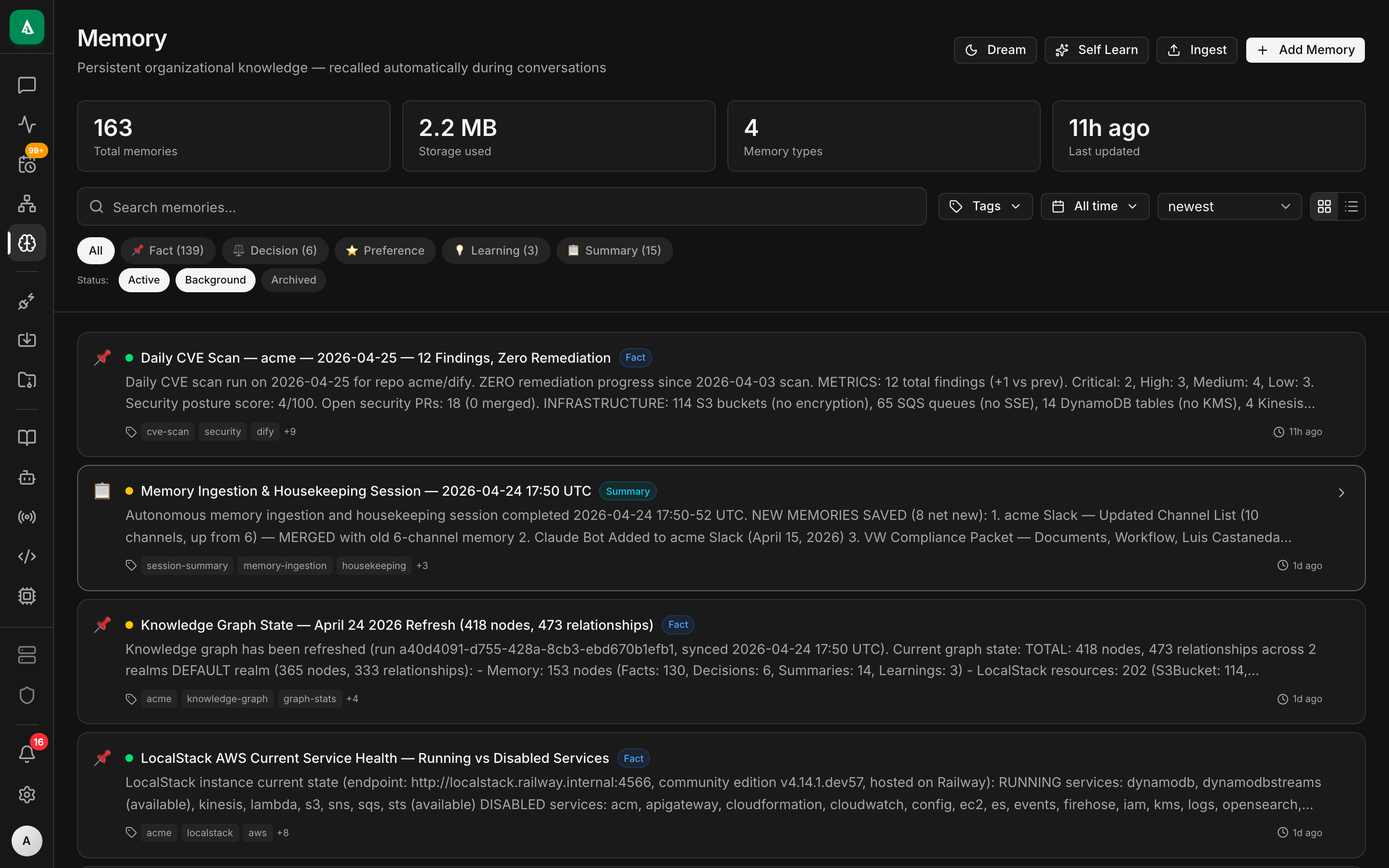
The Memory System is how Agentcy retains facts across conversations. Unlike the knowledge graph — which holds what your systems look like — memory holds what you've told the agent and what the agent has learned.
Examples of memories:
- "We never deploy on Fridays."
- "Acme is the codename for customer #42; always redact the real name externally."
- "The last time this error appeared, the fix was to restart Redis."
Memory is stored twice: as a memvid file on disk (compact, portable) and as Memory nodes in the knowledge graph (queryable, realm-scoped).
Why two stores?
| Store | Optimized for | Used by |
|---|---|---|
memvid (.mv2 file) | fast local recall, portability, backup | agent loop recall during chat |
| Memory nodes (Context Engine) | Structured queries (Cypher on Basic, KQL/SQL on Advanced), realm filters, cross-node joins | UI dashboard, policy decisions, pipelines |
Writes go to memvid first, then fan out to the Context Engine on commit. Reads during chat go to memvid only (in-process, ~ms). Reads from the UI or from a structured query go to the Context Engine.
Lifecycle
Deletes are tombstones in memvid and a deleted_at timestamp in the Context Engine. Compaction reclaims space on a schedule (see MEMORY_COMPACTION_CRON).
Memory types
Each entry has a kind:
| Kind | Meaning | Typical use |
|---|---|---|
fact | A stable, declarative statement | business rules, ownership, conventions |
preference | A person or org preference | "always respond in UK English" |
incident | A resolved incident + lesson | debugging runbook |
contact | A person/team pointer | "oncall is @alice; paging rules in channel…" |
relationship | A learned link between graph nodes | "service-A depends on service-B" |
You can add custom kinds; the agent sees the kind and uses it to weight relevance.
How agents use memory
On every chat turn, the agent loop calls agentcy-memory::recall(query, top_k) with the user's message (embedded). Recall returns the top matches, which the loop injects as a system note:
<memory>
- fact: We never deploy on Fridays. (added 2026-01-12)
- incident: Prod OOM on 2026-02-03 was fixed by bumping pod limits. (mem_id=mem_a1b2)
</memory>Agents can also write memory explicitly via the remember meta-tool:
remember({"kind":"fact","text":"Customer 'Acme' is internal codename for customer #42"})Writes are policy-gated (chat.memory.write). By default, admins and owners can write unrestricted; members can write only fact and incident.
Realms apply
Every memory entry carries a realm. Recall is realm-scoped by default (a chat in realm crm won't see memories from infrastructure). Admins can opt a memory into realm: "*" to make it globally visible.
API
bash
# Write
curl -X POST http://localhost:8080/api/v1/memory \
  -H "authorization: Bearer $TOKEN" -H 'content-type: application/json' \
  -d '{
    "kind": "fact",
    "text": "Frontend on-call uses #fe-oncall Slack channel",
    "realm": "development"
  }'

# Recall
curl "http://localhost:8080/api/v1/memory/recall?q=fe+oncall&limit=5" \
  -H "authorization: Bearer $TOKEN" | jq

# List, paginated
curl "http://localhost:8080/api/v1/memory?kind=fact&limit=50" \
  -H "authorization: Bearer $TOKEN" | jq

# Soft-delete
curl -X DELETE http://localhost:8080/api/v1/memory/$MEM_ID \
  -H "authorization: Bearer $TOKEN"

# Force graph sync (normally automatic)
curl -X POST http://localhost:8080/api/v1/memory/$MEM_ID/sync \
-H "authorization: Bearer $TOKEN"Ingesting external memory
POST /api/v1/memory-ingest/bulk accepts NDJSON and is meant for bootstrapping from existing documentation or runbooks:
bash
curl -X POST http://localhost:8080/api/v1/memory-ingest/bulk \
  -H "authorization: Bearer $TOKEN" \
  -H 'content-type: application/x-ndjson' \
--data-binary @runbooks.ndjsonEach line: {"kind":"…","text":"…","realm":"…","tags":[…]}.
The ingest path deduplicates on text similarity (≥ 0.92 cosine) to keep recall clean.
Storage layout
Default path: ${AGENTCY_DATA_DIR:-/var/lib/agentcy}/memory/<org_id>.mv2
- One file per org. Sharded internally by realm.
.mv2is a compact binary format: header + rolling bloom filter + packed records + embedded HNSW index.- Can be copied between hosts to move or mirror an org. Import via
POST /api/v1/memory-ingest/import-mv2.
Observability
- Memory writes appear in the Activity feed.
- Recall calls are not audited by default (high volume). Enable
MEMORY_AUDIT_RECALLS=trueif you need it. - Memory stats per org:
GET /api/v1/memory/stats→{ entries, deleted, bytes, realms: {…}, last_compacted_at }.
When memory is not the right tool
- Structured data about systems — goes in the graph via connectors, not memory. If you're writing a memory that starts with "the service X has endpoint Y", you probably want an OpenAPI connector.
- Long reference docs — better in RAG (
agentcy-rag) or a memvid export. - Secrets — memory is auditable and recoverable. Secrets belong in env vars or a secrets manager.
Next
- How-To: RAG & Semantic Search — the retrieval counterpart.
- How-To: Audit Log — including memory writes.
- Agent Loop — where recall runs in the chat loop.