
Appearance
Workflows & Orchestrator
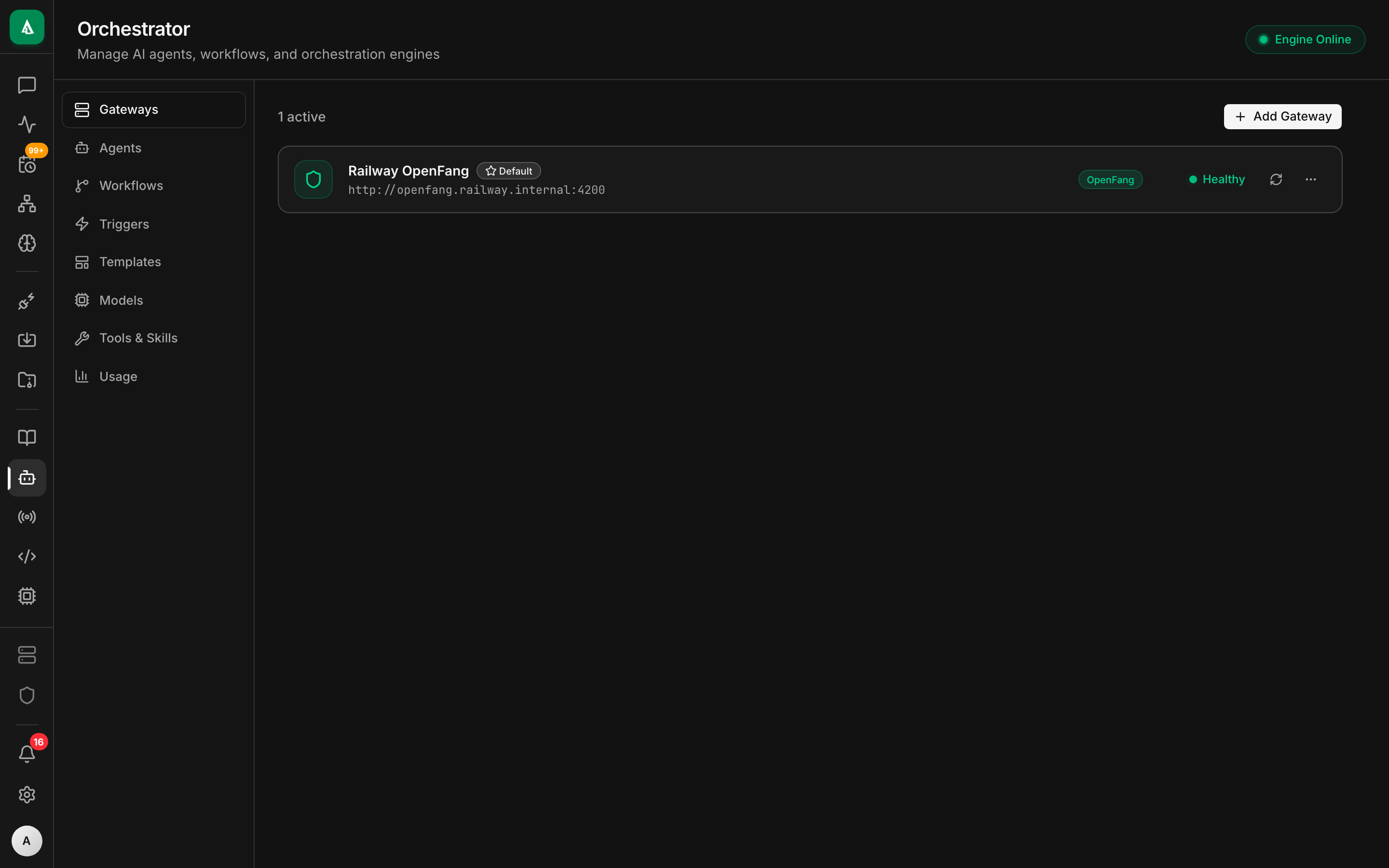
Agentcy's orchestration layer enables complex AI workflows, sub-agent management, and multi-model routing through the OpenFang sidecar service. The orchestration system is optional -- Agentcy's core features (graph, chat, connectors) work without it.
Architecture
The Agentcy backend acts as a proxy to OpenFang, adding authentication, tenant isolation, and graceful degradation.
Enabling OpenFang
OpenFang runs as a Docker container under the subagents profile:
yaml
# docker-compose.yml
services:
  openfang:
    image: ghcr.io/agentcy/openfang:latest
    profiles: ["subagents"]
    ports:
      - "3002:3002"
    environment:
      - DATABASE_URL=postgresql://...
- REDIS_URL=redis://...Start with the profile enabled:
bash
docker compose --profile subagents up -dSet the OpenFang URL in your environment:
env
OPENFANG_URL=http://localhost:3002TIP
OpenFang is entirely optional. When it is unavailable, all orchestration endpoints return 503 Service Unavailable with a clear error message. The rest of Agentcy continues to work normally.
UI Overview
The orchestration page at /orchestrator provides 8 tabs:
| Tab | Description |
|---|---|
| Gateways | Manage AI model gateways for routing requests to different providers |
| Agents | Create, configure, and monitor sub-agents |
| Workflows | Build and manage multi-step automation workflows |
| Triggers | Schedule workflows via cron, webhooks, or lifecycle events |
| Templates | Pre-built workflow templates for common patterns |
| Models | View and configure available AI models across gateways |
| Skills | Reusable skill definitions that agents can invoke |
| Usage | Token usage, cost tracking, and rate limit monitoring |
Gateways
Gateways manage routing to different AI providers. Each gateway defines a provider, authentication, and routing rules.
Create a Gateway
POST /api/v1/orchestration/gatewaysjson
{
  "name": "Claude Production",
  "provider": "anthropic",
  "config": {
    "api_key": "sk-ant-...",
    "default_model": "claude-sonnet-4-20250514",
    "max_tokens": 8192,
    "rate_limit_rpm": 1000
  },
  "priority": 1,
  "enabled": true
}Gateway Routing
When multiple gateways are configured, the system routes requests based on:
- Priority -- lower number = higher priority
- Model availability -- route to the gateway that supports the requested model
- Rate limits -- fall back to secondary gateways when primary is rate-limited
- Health -- skip gateways that are down
Agents
Sub-agents are isolated AI contexts that can be spawned for specific tasks.
Create an Agent
POST /api/v1/orchestration/agentsjson
{
  "name": "Code Reviewer",
  "description": "Reviews pull requests for security issues and best practices",
  "model": "claude-sonnet-4-20250514",
  "gateway_id": "gw-123",
  "system_prompt": "You are a code review specialist...",
  "tools": ["search_nodes", "run_cypher"],
  "max_turns": 5
}Agent Lifecycle
Workflows
Workflows define multi-step automation sequences. Each step can execute tools, call sub-agents, run conditionals, or wait for events.
Workflow Structure
json
{
  "name": "PR Review Pipeline",
  "description": "Automated PR review and notification",
  "steps": [
    {
      "id": "fetch-pr",
      "type": "tool",
      "tool_name": "execute_connector_tool",
      "params": {
        "source_id": "github-1",
        "tool_name": "get_pull_request",
        "params": { "repo": "{{trigger.repo}}", "number": "{{trigger.pr_number}}" }
      }
    },
    {
      "id": "review",
      "type": "agent",
      "agent_id": "code-reviewer",
      "input": "Review this PR: {{steps.fetch-pr.output}}",
      "depends_on": ["fetch-pr"]
    },
    {
      "id": "notify",
      "type": "tool",
      "tool_name": "execute_connector_tool",
      "params": {
        "source_id": "github-1",
        "tool_name": "create_comment",
        "params": {
          "repo": "{{trigger.repo}}",
          "issue_number": "{{trigger.pr_number}}",
          "body": "{{steps.review.output}}"
        }
      },
      "depends_on": ["review"]
    }
  ]
}Visual Workflow Editor
The editor at /orchestrator/workflows/:id/edit provides a full-screen canvas built with React Flow:
- Drag-and-drop step nodes onto the canvas
- Connect steps by dragging edges between nodes
- Properties panel on the right for editing step configuration
- Variable interpolation using
{{trigger.*}}and{{steps.<id>.output}} - Step types: Tool, Agent, Condition, Loop, Wait, Parallel
- Toolbar with save, run, and trigger creation buttons
Step types
| Type | Description |
|---|---|
| Tool | Execute a graph tool or connector tool |
| Agent | Invoke a sub-agent with a prompt |
| Condition | Branch based on a condition expression |
| Loop | Iterate over an array from a previous step |
| Wait | Pause for a duration or until an event |
| Parallel | Run multiple steps concurrently |
Creating a New Workflow
Navigate to /orchestrator/workflows/new to create a workflow from scratch in the visual editor, or use the quick-edit sheet on the workflows tab for simple edits.
Running a Workflow
POST /api/v1/orchestration/workflows/:id/runjson
{
  "inputs": {
    "repo": "frontend",
    "pr_number": 142
  }
}json
{
  "run_id": "run-abc-123",
  "status": "running",
  "started_at": "2026-03-10T12:00:00Z"
}Viewing Run History
GET /api/v1/orchestration/workflows/:id/runsThe workflow detail page at /orchestrator/workflows/:id shows:
- Run history with status, duration, and step-by-step results
- Steps overview with the execution graph
- A Run button to trigger manually
Triggers
Triggers automate workflow execution. Three types are supported:
Schedule (Cron)
json
{
  "type": "schedule",
  "workflow_id": "wf-123",
  "config": {
    "cron": "0 9 * * 1-5",
    "timezone": "America/New_York"
  }
}Webhook
json
{
  "type": "webhook",
  "workflow_id": "wf-123",
  "config": {
    "path": "/hooks/pr-review",
    "secret": "whsec_...",
    "filter": "$.action == 'opened'"
  }
}The webhook URL is exposed at:
POST /api/v1/orchestration/webhooks/:pathLifecycle
Triggered by Agentcy system events:
json
{
  "type": "lifecycle",
  "workflow_id": "wf-123",
  "config": {
    "event": "source.sync.completed",
    "source_id": "github-1"
  }
}Available lifecycle events:
| Event | Description |
|---|---|
source.sync.completed | A connector sync finished successfully |
source.sync.failed | A connector sync failed |
worker.registered | A new worker came online |
worker.disconnected | A worker went offline |
policy.violation | A policy deny was triggered |
Graceful Degradation
When OpenFang is unavailable, all orchestration endpoints return:
json
{
  "error": "Orchestration service unavailable",
  "code": "SERVICE_UNAVAILABLE",
  "message": "OpenFang sidecar is not running. Start it with: docker compose --profile subagents up -d"
}The frontend detects this and shows a setup prompt instead of empty tabs.
WARNING
Workflows that are scheduled via triggers will not execute while OpenFang is down. Missed triggers are not replayed when the service comes back online.
API Reference
| Method | Endpoint | Description |
|---|---|---|
| Gateways | ||
| POST | /api/v1/orchestration/gateways | Create gateway |
| GET | /api/v1/orchestration/gateways | List gateways |
| GET | /api/v1/orchestration/gateways/:id | Get gateway |
| PUT | /api/v1/orchestration/gateways/:id | Update gateway |
| DELETE | /api/v1/orchestration/gateways/:id | Delete gateway |
| Agents | ||
| POST | /api/v1/orchestration/agents | Create agent |
| GET | /api/v1/orchestration/agents | List agents |
| GET | /api/v1/orchestration/agents/:id | Get agent |
| PUT | /api/v1/orchestration/agents/:id | Update agent |
| DELETE | /api/v1/orchestration/agents/:id | Delete agent |
| Workflows | ||
| POST | /api/v1/orchestration/workflows | Create workflow |
| GET | /api/v1/orchestration/workflows | List workflows |
| GET | /api/v1/orchestration/workflows/:id | Get workflow |
| PUT | /api/v1/orchestration/workflows/:id | Update workflow |
| DELETE | /api/v1/orchestration/workflows/:id | Delete workflow |
| POST | /api/v1/orchestration/workflows/:id/run | Run workflow |
| GET | /api/v1/orchestration/workflows/:id/runs | Get run history |
| Triggers | ||
| POST | /api/v1/orchestration/triggers | Create trigger |
| GET | /api/v1/orchestration/triggers | List triggers |
| DELETE | /api/v1/orchestration/triggers/:id | Delete trigger |
| Templates | ||
| GET | /api/v1/orchestration/templates | List templates |
| POST | /api/v1/orchestration/templates/:id/instantiate | Create workflow from template |
| Models & Usage | ||
| GET | /api/v1/orchestration/models | List available models |
| GET | /api/v1/orchestration/usage | Usage statistics |