
Appearance
Embedding in Apps
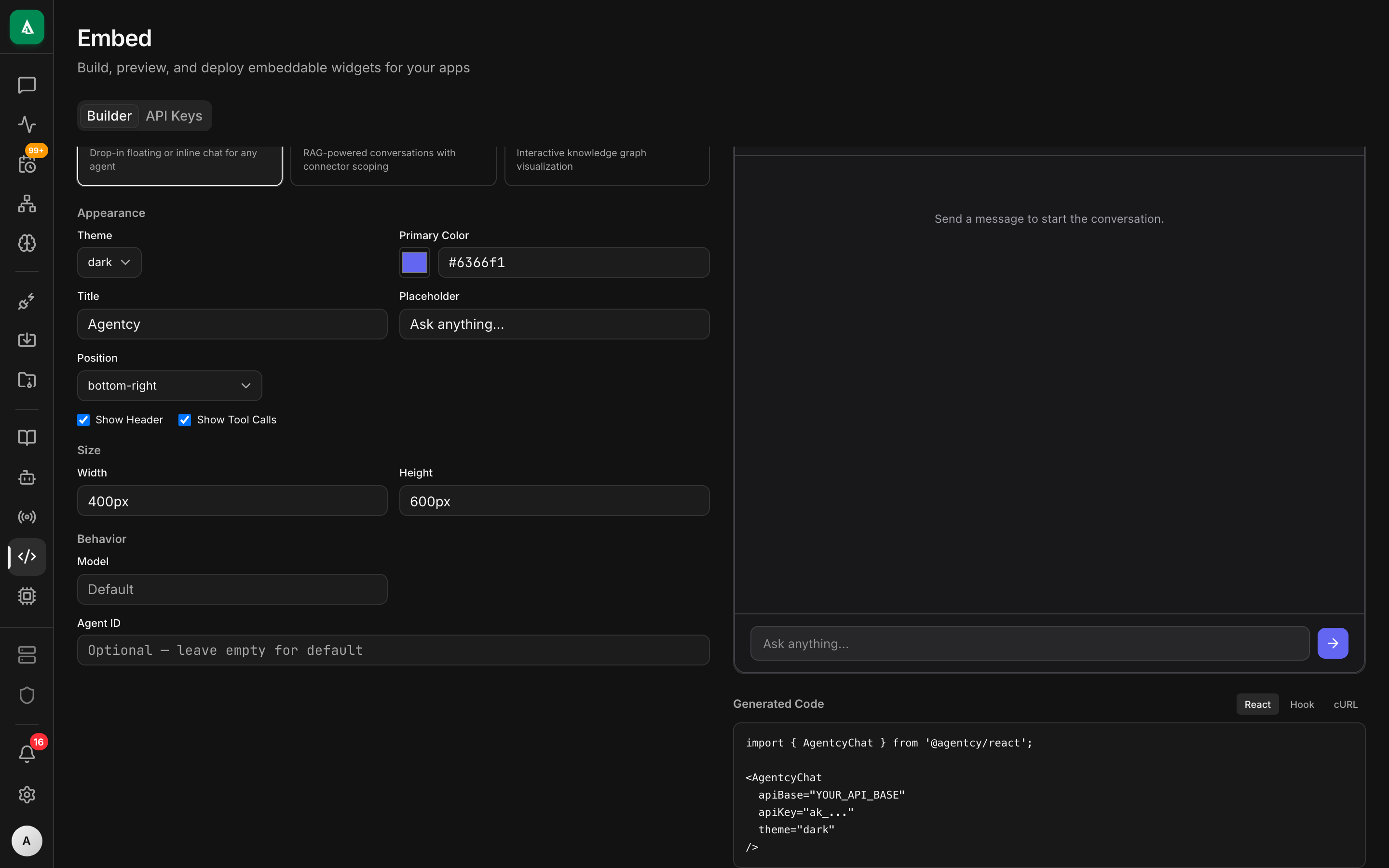
Embed AI-powered chat, knowledge graph exploration, and connector-aware agents into any React application using @agentcy/react. For non-React apps, integrate directly with the REST API.
Architecture
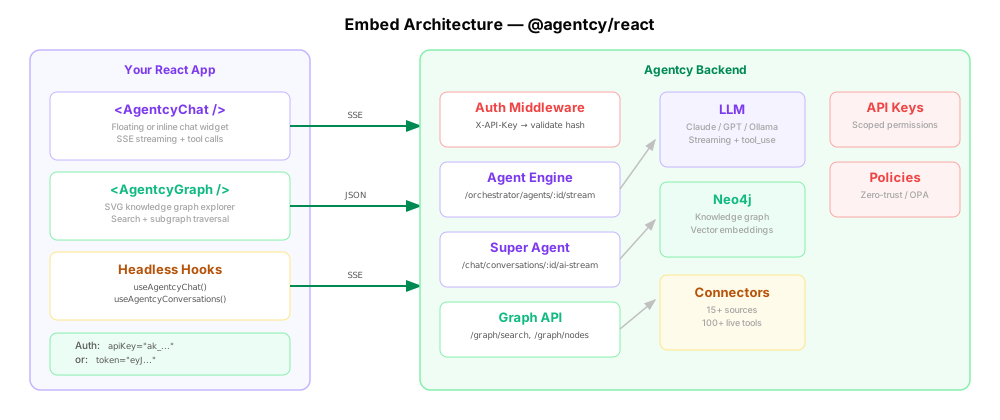
The SDK components communicate with the Agentcy backend over HTTP/SSE. API key authentication removes the need for any login flow — your end users interact with AI agents without creating accounts.
Authentication
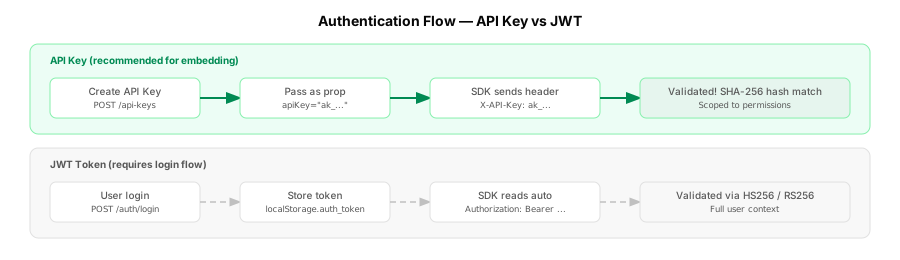
| Method | Header | Best for |
|---|---|---|
| API Key (recommended) | X-API-Key: ak_... | Embedded deployments — no login flow needed |
| JWT Token | Authorization: Bearer <token> | First-party apps with user login |
API keys are created in the Agentcy dashboard under Settings > API Keys or the Embed page. Keys are scoped to specific permissions (chat:use, graph:read, etc.) and respect zero-trust policies.
Quick Start with @agentcy/react
Install the SDK:
bash
npm install @agentcy/reactEmbed a Chat Widget
The AgentcyChat component renders a fully functional AI chat widget — either as a floating bubble or inline container. No additional dependencies required.
tsx
import { AgentcyChat } from '@agentcy/react';

export default function App() {
  return (
    <AgentcyChat
      agentId="my-agent"
      apiBase="https://agentcy.example.com"
      apiKey="ak_live_xxxxxxxxxxxx"
      title="Infrastructure Assistant"
      theme="dark"
      position="bottom-right"
    />
  );
}This gives you a floating chat bubble in the bottom-right corner. Clicking it opens a full chat interface with streaming responses, tool call visualization, and automatic reconnection.
Inline Mode
For embedding directly into your layout instead of as a floating bubble:
tsx
<AgentcyChat
  agentId="my-agent"
  apiBase="https://agentcy.example.com"
  apiKey="ak_live_xxxxxxxxxxxx"
  position="inline"
  width="100%"
  height="500px"
  showHeader={false}
/>Customization Props
| Prop | Type | Default | Description |
|---|---|---|---|
agentId | string | required | Orchestrated agent ID |
apiBase | string | required | Agentcy API base URL |
apiKey | string | — | API key (recommended for embedding) |
token | string | — | JWT token (falls back to localStorage) |
gatewayId | string | — | Gateway ID for multi-gateway setups |
title | string | "AI Assistant" | Header title |
placeholder | string | "Type a message..." | Input placeholder |
theme | 'light' | 'dark' | 'system' | "system" | Color theme |
position | 'bottom-right' | 'bottom-left' | 'inline' | "bottom-right" | Widget position |
primaryColor | string | "#6366f1" | Accent color (hex) |
showToolCalls | boolean | true | Show tool execution cards |
streaming | boolean | true | Enable SSE streaming |
maxTurns | number | — | Auto-stop after N agent turns |
initialMessage | string | — | Send this message on mount |
renderToolCall | (tool) => ReactNode | null | — | Custom tool call renderer |
renderMessage | (msg, i) => ReactNode | null | — | Custom message renderer |
toolFilter | (tool) => boolean | — | Filter which tool calls to show |
onSend | (message) => void | — | Callback when user sends a message |
onResponse | (message) => void | — | Callback when agent responds |
onError | (error) => void | — | Callback on error |
Embed a Graph Explorer
The AgentcyGraph component renders an interactive SVG-based knowledge graph visualization with built-in search. No React Flow or other graph library needed.
tsx
import { AgentcyGraph } from '@agentcy/react';

export default function KnowledgeExplorer() {
  return (
    <AgentcyGraph
      apiBase="https://agentcy.example.com"
      apiKey="ak_live_xxxxxxxxxxxx"
      query="kubernetes"
      width="100%"
      height="600px"
      theme="dark"
      onNodeClick={(node) => console.log('Clicked:', node.labels, node.properties)}
    />
  );
}This renders a force-directed graph with color-coded nodes by label (Repository, Pod, IAMRole, etc.), edge labels for relationship types, and a search bar for exploring the knowledge graph.
Graph Props
| Prop | Type | Default | Description |
|---|---|---|---|
apiBase | string | required | Agentcy API base URL |
apiKey | string | — | API key |
token | string | — | JWT token |
nodeId | string | — | Initial node ID to display subgraph for |
query | string | — | Initial search query |
width | string | "100%" | Container width |
height | string | "400px" | Container height |
theme | 'light' | 'dark' | 'system' | "system" | Color theme |
onNodeClick | (node) => void | — | Callback when a node is clicked |
Headless Hooks
For full control over the UI, use the headless hooks instead of the pre-built components.
useAgentcyChat — Orchestrated Agents
Communicates with orchestrated sub-agents via the /orchestrator/agents/:id/message/stream endpoint:
tsx
import { useAgentcyChat } from '@agentcy/react';

function MyCustomChat() {
  const { messages, input, setInput, sendMessage, isStreaming, stop, error } =
    useAgentcyChat({
      agentId: 'infra-agent',
      apiBase: 'https://agentcy.example.com',
      apiKey: 'ak_live_xxxxxxxxxxxx',
      maxTurns: 5,
      onEvent: (event) => {
        if (event.type === 'thinking_delta') {
          console.log('Agent thinking:', event.delta);
        }
      },
    });

  return (
    <div>
      {messages.map((msg, i) => (
        <div key={i} className={msg.role === 'user' ? 'user-msg' : 'ai-msg'}>
          <p>{msg.content}</p>
          {msg.tools?.map((tool) => (
            <div key={tool.id}>
              {tool.name}: {tool.isError ? 'failed' : 'success'}
            </div>
          ))}
        </div>
      ))}
      <input value={input} onChange={(e) => setInput(e.target.value)} />
      <button onClick={() => sendMessage()} disabled={isStreaming}>
        {isStreaming ? 'Streaming...' : 'Send'}
      </button>
      {isStreaming && <button onClick={stop}>Stop</button>}
    </div>
  );
}useAgentcyConversations — Super Agent (RAG + Connectors)
Communicates with the main conversation endpoint at /chat/conversations/:id/ai-stream, which has access to the full knowledge graph, connectors, and RAG pipeline:
tsx
import { useAgentcyConversations } from '@agentcy/react';

function InfraChat() {
  const { messages, sendMessage, conversationId, isStreaming, stop } =
    useAgentcyConversations({
      apiBase: 'https://agentcy.example.com',
      apiKey: 'ak_live_xxxxxxxxxxxx',
      sourceIds: ['github-source-uuid', 'aws-source-uuid'],
      mode: 'act',
      onConversationCreated: (id) => {
        console.log('New conversation:', id);
      },
    });

  // ... render your UI
}useAgentcyGraph — Knowledge Graph
tsx
import { useAgentcyGraph } from '@agentcy/react';

function MyGraphView() {
  const { nodes, relationships, isLoading, search, getSubgraph, getStats } =
    useAgentcyGraph({
      apiBase: 'https://agentcy.example.com',
      apiKey: 'ak_live_xxxxxxxxxxxx',
    });

  // Search for nodes
  await search('kubernetes pods');

  // Expand a node's neighborhood
  await getSubgraph(nodes[0].id);

  // Get graph-wide statistics
  const stats = await getStats();
}Full Example: Operations Dashboard
Combining chat, graph, and connectors in a single internal tool:
tsx
'use client';

import { AgentcyChat, AgentcyGraph } from '@agentcy/react';
import { useState } from 'react';

const API_BASE = 'https://agentcy.example.com';
const API_KEY = 'ak_live_xxxxxxxxxxxx';

export default function OperationsPage() {
  const [activeTab, setActiveTab] = useState<'chat' | 'graph'>('chat');

  return (
    <div className="flex h-screen">
      {/* Your existing app content */}
      <main className="flex-1 p-6">
        <h1>Operations Dashboard</h1>
        {/* ... your existing UI ... */}
      </main>

      {/* Agentcy sidebar */}
      <aside className="w-[440px] border-l flex flex-col">
        <div className="flex border-b">
          <button
            onClick={() => setActiveTab('chat')}
            className={`flex-1 px-4 py-2 text-sm ${
              activeTab === 'chat' ? 'border-b-2 border-indigo-500 font-medium' : ''
            }`}
          >
            AI Assistant
          </button>
          <button
            onClick={() => setActiveTab('graph')}
            className={`flex-1 px-4 py-2 text-sm ${
              activeTab === 'graph' ? 'border-b-2 border-indigo-500 font-medium' : ''
            }`}
          >
            Knowledge Graph
          </button>
        </div>

        {activeTab === 'chat' && (
          <AgentcyChat
            agentId="infra-agent"
            apiBase={API_BASE}
            apiKey={API_KEY}
            position="inline"
            width="100%"
            height="100%"
            title="Infrastructure Assistant"
          />
        )}

        {activeTab === 'graph' && (
          <AgentcyGraph
            apiBase={API_BASE}
            apiKey={API_KEY}
            query="kubernetes"
            width="100%"
            height="100%"
          />
        )}
      </aside>
    </div>
  );
}SSE Stream Events
The streaming endpoints emit these event types:
| Event Type | Description | Key Fields |
|---|---|---|
text_delta | Text content chunk | delta |
thinking_delta | Agent reasoning chunk | delta |
tool_execution_start | Tool call begins | tool_call_id, tool_name, arguments |
tool_execution_end | Tool call completes | tool_call_id, output, is_error |
turn_start | New agent turn begins | — |
turn_end | Agent turn completes | — |
agent_start | Agent loop begins | — |
agent_end | Agent loop ends | — |
error | Error occurred | message |
All events are delivered as data: {json}\n\n lines. The stream ends with data: [DONE].
Custom Integration (Advanced)
If you need full control beyond what the SDK provides, you can integrate directly with the REST API using your own HTTP client.
API Client
typescript
// lib/agentcy-client.ts

const BASE_URL = process.env.NEXT_PUBLIC_AGENTCY_URL || 'http://localhost:18080';
const API_KEY = process.env.NEXT_PUBLIC_AGENTCY_API_KEY;

async function request<T>(
  path: string,
  options: RequestInit = {}
): Promise<T> {
  const headers: Record<string, string> = {
    'Content-Type': 'application/json',
    ...((options.headers as Record<string, string>) || {}),
  };

  // API key takes priority over JWT
  if (API_KEY) {
    headers['X-API-Key'] = API_KEY;
  } else {
    const token = localStorage.getItem('auth_token');
    if (token) headers['Authorization'] = `Bearer ${token}`;
  }

  const res = await fetch(`${BASE_URL}/api/v1${path}`, {
    ...options,
    headers,
  });

  if (!res.ok) {
    const error = await res.json().catch(() => ({ error: res.statusText }));
    throw new Error(error.error || `API error: ${res.status}`);
  }

  return res.json();
}

export const agentcy = {
  // Auth
  login: (email: string, password: string) =>
    request<{ token: string; user: any }>('/auth/login', {
      method: 'POST',
      body: JSON.stringify({ email, password }),
    }),

  // Conversations (super agent)
  listConversations: () =>
    request<{ conversations: any[] }>('/chat/conversations'),
  createConversation: (title?: string) =>
    request<any>('/chat/conversations', {
      method: 'POST',
      body: JSON.stringify({ title }),
    }),
  getMessages: (conversationId: string) =>
    request<{ messages: any[] }>(`/chat/conversations/${conversationId}/messages`),
  streamUrl: (conversationId: string) =>
    `${BASE_URL}/api/v1/chat/conversations/${conversationId}/ai-stream`,

  // Orchestrated agents
  agentStreamUrl: (agentId: string) =>
    `${BASE_URL}/api/v1/orchestrator/agents/${agentId}/message/stream`,
  agentMessageUrl: (agentId: string) =>
    `${BASE_URL}/api/v1/orchestrator/agents/${agentId}/message`,

  // Sources
  listSources: () => request<{ sources: any[] }>('/sources'),
  getSource: (id: string) => request<any>(`/sources/${id}`),
  syncSource: (id: string) =>
    request<any>(`/sources/${id}/sync`, { method: 'POST' }),

  // Graph
  searchNodes: (query: string, limit = 20) =>
    request<any>(`/graph/search?q=${encodeURIComponent(query)}&limit=${limit}`),
  getNode: (id: string) => request<any>(`/graph/nodes/${id}`),
  getSubgraph: (id: string, depth = 2) =>
    request<any>(`/graph/nodes/${id}/subgraph?depth=${depth}`),
  getGraphStats: () => request<any>('/graph/stats'),

  // RAG
  ragQuery: (question: string) =>
    request<any>('/rag/query', {
      method: 'POST',
      body: JSON.stringify({ question, top_k: 5 }),
    }),

  // API Keys
  listApiKeys: () => request<any>('/auth/api-keys'),
  createApiKey: (name: string) =>
    request<any>('/auth/api-keys', {
      method: 'POST',
      body: JSON.stringify({ name }),
    }),
  revokeApiKey: (id: string) =>
    request<any>(`/auth/api-keys/${id}`, { method: 'DELETE' }),
};Custom SSE Streaming
For a DIY streaming implementation:
typescript
async function streamChat(
  conversationId: string,
  message: string,
  onDelta: (text: string) => void,
  onToolStart?: (name: string, args: Record<string, unknown>) => void,
  onToolEnd?: (name: string, result: string, isError: boolean) => void,
) {
  const headers: Record<string, string> = {
    'Content-Type': 'application/json',
  };

  const apiKey = process.env.NEXT_PUBLIC_AGENTCY_API_KEY;
  if (apiKey) {
    headers['X-API-Key'] = apiKey;
  } else {
    const token = localStorage.getItem('auth_token');
    if (token) headers['Authorization'] = `Bearer ${token}`;
  }

  const response = await fetch(
    `${BASE_URL}/api/v1/chat/conversations/${conversationId}/ai-stream`,
    {
      method: 'POST',
      headers,
      body: JSON.stringify({ message }),
    }
  );

  const reader = response.body!.getReader();
  const decoder = new TextDecoder();
  let buffer = '';

  while (true) {
    const { done, value } = await reader.read();
    if (done) break;

    buffer += decoder.decode(value, { stream: true });
    const lines = buffer.split('\n');
    buffer = lines.pop() || '';

    for (const line of lines) {
      if (!line.startsWith('data: ')) continue;
      const raw = line.slice(6).trim();
      if (!raw || raw === '[DONE]') continue;

      try {
        const event = JSON.parse(raw);

        switch (event.type) {
          case 'text_delta':
            onDelta(event.delta);
            break;
          case 'thinking_delta':
            // Agent reasoning — show in a collapsible section
            break;
          case 'tool_execution_start':
            onToolStart?.(event.tool_name, event.arguments);
            break;
          case 'tool_execution_end':
            onToolEnd?.(event.tool_name, event.output, event.is_error);
            break;
          case 'turn_start':
          case 'turn_end':
          case 'agent_start':
          case 'agent_end':
            // Lifecycle events — use for progress indicators
            break;
          case 'error':
            console.error('Stream error:', event.message);
            break;
        }
      } catch {
        // Skip non-JSON lines
      }
    }
  }
}Service Accounts
For embedded deployments using JWT auth, create a dedicated service account with appropriate permissions rather than using end-user credentials. Pair this with zero-trust policies to restrict what the embedded client can access. API keys are the recommended alternative — they avoid the need for a login flow entirely.
CORS Configuration
When embedding Agentcy in a separate frontend application, ensure the backend allows your domain:
bash
# The Agentcy backend includes permissive CORS by default in dev mode.
# For production, configure allowed origins in your reverse proxy.Key API Endpoints for Embedding
| Feature | Endpoint | Method | Description |
|---|---|---|---|
| Login | /api/v1/auth/login | POST | Returns JWT token |
| API Keys | /api/v1/auth/api-keys | GET/POST/DELETE | Manage API keys |
| Create conversation | /api/v1/chat/conversations | POST | Create a new conversation |
| Stream chat (super agent) | /api/v1/chat/conversations/:id/ai-stream | POST | SSE stream with RAG + connectors |
| Resume stream | /api/v1/chat/conversations/:id/resume-stream | GET | Reconnect to active stream |
| Agent message (sync) | /api/v1/orchestrator/agents/:id/message | POST | Synchronous agent response |
| Agent message (stream) | /api/v1/orchestrator/agents/:id/message/stream | POST | SSE stream from orchestrated agent |
| List agents | /api/v1/orchestrator/agents | GET | Available orchestrated agents |
| List sources | /api/v1/sources | GET | All configured connectors |
| Sync source | /api/v1/sources/:id/sync | POST | Trigger connector sync |
| Search graph | /api/v1/graph/search | GET | Search nodes by query |
| Get subgraph | /api/v1/graph/nodes/:id/subgraph | GET | Node neighborhood (nodes + edges) |
| Graph stats | /api/v1/graph/stats | GET | Node/edge counts by label |
| RAG query | /api/v1/rag/query | POST | Answer + source documents |
For the full API reference, see REST API Reference.