
Appearance
React SDK
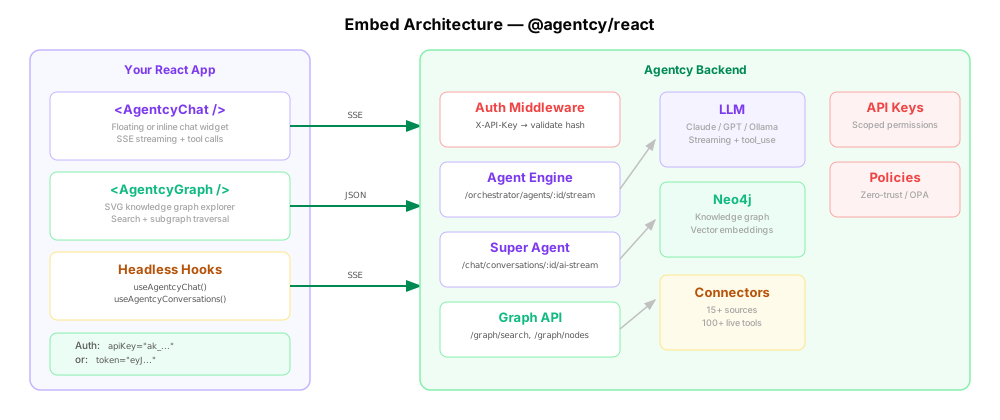
The @agentcy/react package provides drop-in components and headless hooks for embedding Agentcy in any React application. Users get streaming AI chat, tool execution, knowledge graph exploration, and connector-scoped conversations without leaving your app.
Installation
bash
npm install @agentcy/reactbash
pnpm add @agentcy/react
# or
yarn add @agentcy/reactRequirements: React 18+ (React 19 recommended), a running Agentcy backend.
Authentication
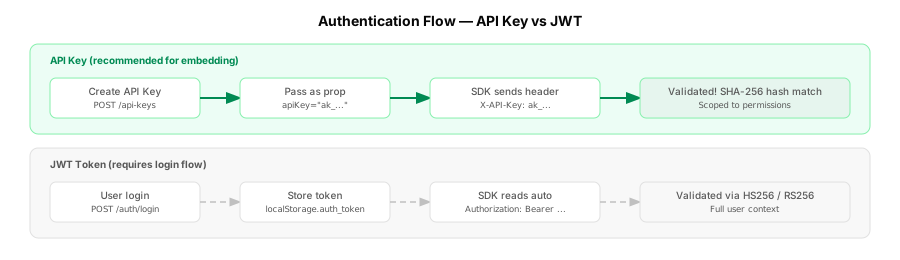
Two methods are supported. API key auth is recommended for embedded use cases.
API Key (recommended)
Generate a key in Settings > API Keys, then pass it as a prop. The key is sent via the X-API-Key header. Keys have scoped permissions and can be revoked at any time.
tsx
<AgentcyChat apiBase="https://agentcy.example.com" apiKey="ak_..." agentId="my-agent" />JWT Token
Pass a JWT directly, or omit it to let the SDK read from localStorage.auth_token:
tsx
<AgentcyChat apiBase="https://agentcy.example.com" token="eyJ..." agentId="my-agent" />To obtain a token programmatically:
ts
const res = await fetch('https://agentcy.example.com/api/v1/auth/login', {
  method: 'POST',
  headers: { 'Content-Type': 'application/json' },
  body: JSON.stringify({ email: 'user@example.com', password: 'password' }),
});
const { token } = await res.json();If both apiKey and token are provided, apiKey takes priority.
Quick Start
Drop-in Chat
tsx
import { AgentcyChat } from '@agentcy/react';

export default function App() {
  return (
    <AgentcyChat
      agentId="your-agent-id"
      apiBase="https://agentcy.example.com"
      apiKey="ak_..."
      title="Support Agent"
      theme="dark"
      position="bottom-right"
    />
  );
}Set position="inline" to render the chat inside the normal document flow instead of as a floating widget.
Graph Explorer
tsx
import { AgentcyGraph } from '@agentcy/react';

export default function App() {
  return (
    <AgentcyGraph
      apiBase="https://agentcy.example.com"
      apiKey="ak_..."
      query="kubernetes"
      width="100%"
      height="500px"
      theme="dark"
      onNodeClick={(node) => console.log('Clicked:', node)}
    />
  );
}Headless Chat Hook
tsx
import { useAgentcyChat } from '@agentcy/react';

export default function CustomChat() {
  const { messages, input, setInput, sendMessage, isStreaming, stop, reset, error } =
    useAgentcyChat({
      agentId: 'your-agent-id',
      apiBase: 'https://agentcy.example.com',
      apiKey: 'ak_...',
      maxTurns: 5,
      onTurn: (turn) => {
        if (turn > 3) return false; // abort after 3 turns
      },
    });

  return (
    <div>
      {messages.map((m, i) => (
        <p key={i}>{m.content}</p>
      ))}
      <input value={input} onChange={(e) => setInput(e.target.value)} />
      <button onClick={() => sendMessage()} disabled={isStreaming}>
        Send
      </button>
    </div>
  );
}Super Agent Conversations
Use useAgentcyConversations for RAG-powered conversations scoped to specific connectors:
tsx
import { useAgentcyConversations } from '@agentcy/react';

export default function SuperAgent() {
  const { messages, sendMessage, conversationId } = useAgentcyConversations({
    apiBase: 'https://agentcy.example.com',
    apiKey: 'ak_...',
    sourceIds: ['connector-uuid'],
    mode: 'act',
    onConversationCreated: (id) => console.log('Conversation:', id),
  });
  // ... render custom UI
}Headless Graph Hook
tsx
import { useAgentcyGraph } from '@agentcy/react';

export default function CustomGraph() {
  const { nodes, relationships, isLoading, search, getSubgraph, getStats } = useAgentcyGraph({
    apiBase: 'https://agentcy.example.com',
    apiKey: 'ak_...',
  });

  // Search and explore
  await search('kubernetes pods');
  await getSubgraph(nodes[0].id);
}Components
<AgentcyChat />
Full-featured chat widget with message list, composer, streaming responses, and tool call rendering.
| Prop | Type | Default | Description |
|---|---|---|---|
agentId | string | required | Agent ID to connect to |
apiBase | string | required | Base URL of the Agentcy API |
apiKey | string | -- | API key (X-API-Key header) |
token | string | -- | JWT token; falls back to localStorage.auth_token |
gatewayId | string | -- | Gateway ID for multi-gateway setups |
title | string | "AI Assistant" | Chat window title |
placeholder | string | "Type a message..." | Input placeholder |
theme | 'light' | 'dark' | 'system' | 'system' | Color theme |
position | 'bottom-right' | 'bottom-left' | 'inline' | 'bottom-right' | Widget position mode |
primaryColor | string | '#6366f1' | Accent color (hex) |
showHeader | boolean | true | Show the title bar |
showToolCalls | boolean | true | Show tool call cards in the message stream |
streaming | boolean | true | Use SSE streaming |
maxTurns | number | -- | Max agent turns before auto-stop |
initialMessage | string | -- | Auto-send this message on mount |
width | string | '400px' | Width (inline mode only) |
height | string | '600px' | Height (inline mode only) |
className | string | -- | CSS class for the container |
renderToolCall | (tool: AgentcyToolCall) => ReactNode | null | -- | Custom tool call renderer |
renderMessage | (msg: AgentcyMessage, index: number) => ReactNode | null | -- | Custom message renderer |
toolFilter | (tool: AgentcyToolCall) => boolean | -- | Filter which tool calls to display |
onSend | (message: string) => void | -- | Called when user sends a message |
onResponse | (message: AgentcyMessage) => void | -- | Called when agent responds |
onError | (error: Error) => void | -- | Called on error |
<AgentcyGraph />
SVG-based interactive knowledge graph explorer with search and subgraph navigation.
| Prop | Type | Default | Description |
|---|---|---|---|
apiBase | string | required | Base URL of the Agentcy API |
apiKey | string | -- | API key |
token | string | -- | JWT token |
nodeId | string | -- | Initial node ID to display subgraph for |
query | string | -- | Initial search query |
width | string | '100%' | Container width |
height | string | '400px' | Container height |
theme | 'light' | 'dark' | 'system' | 'system' | Color theme |
onNodeClick | (node: AgentcyGraphNode) => void | -- | Called when a node is clicked |
Hooks
useAgentcyChat(options)
Headless hook for building custom chat UIs. Returns message state, input management, and streaming controls.
Options:
| Option | Type | Default | Description |
|---|---|---|---|
agentId | string | required | Agent ID |
apiBase | string | required | API base URL |
apiKey | string | -- | API key |
token | string | -- | JWT token |
gatewayId | string | -- | Gateway ID |
streaming | boolean | true | Enable SSE streaming |
maxTurns | number | -- | Max turns before auto-stop |
onMessage | (msg: AgentcyMessage) => void | -- | New message callback |
onError | (err: Error) => void | -- | Error callback |
onEvent | (evt: AgentcyStreamEvent) => void | -- | Raw SSE event callback |
onTurn | (turn: number, msg: AgentcyMessage) => boolean | void | -- | Turn callback; return false to abort |
Returns:
| Field | Type | Description |
|---|---|---|
messages | AgentcyMessage[] | All messages in the conversation |
input | string | Current input text |
setInput | (value: string) => void | Set the input text |
sendMessage | (text?: string) => Promise<void> | Send a message |
isStreaming | boolean | Whether the agent is streaming |
stop | () => void | Abort the current response |
reset | () => void | Clear all messages |
error | Error | null | Last error |
useAgentcyConversations(options)
Hook for Super Agent RAG conversations with connector scoping and conversation continuity.
Options:
| Option | Type | Default | Description |
|---|---|---|---|
apiBase | string | required | API base URL |
apiKey | string | -- | API key |
token | string | -- | JWT token |
conversationId | string | -- | Existing conversation to continue |
sourceIds | string[] | -- | Scope to specific connectors |
model | string | -- | LLM model override |
mode | 'act' | 'plan' | -- | Agent mode |
onConversationCreated | (id: string) => void | -- | Called when a new conversation is created |
onMessage | (msg: AgentcyMessage) => void | -- | New message callback |
onError | (err: Error) => void | -- | Error callback |
onEvent | (evt: AgentcyStreamEvent) => void | -- | Raw SSE event callback |
Returns: Same as useAgentcyChat, plus conversationId: string | null.
useAgentcyGraph(options)
Headless hook for knowledge graph search, subgraph fetching, and stats.
Options:
| Option | Type | Default | Description |
|---|---|---|---|
apiBase | string | required | API base URL |
apiKey | string | -- | API key |
token | string | -- | JWT token |
Returns:
| Field | Type | Description |
|---|---|---|
nodes | AgentcyGraphNode[] | Current nodes |
relationships | AgentcyGraphRelationship[] | Current relationships |
isLoading | boolean | Loading state |
error | Error | null | Last error |
search | (query: string) => Promise<void> | Search nodes by text |
getSubgraph | (nodeId: string) => Promise<void> | Load subgraph for a node |
getStats | () => Promise<Record<string, unknown>> | Fetch graph statistics |
SSE Events
When streaming is enabled, the SDK processes these server-sent events:
| Event | Description |
|---|---|
text_delta | Text content chunk |
thinking_delta | Reasoning/thinking chunk |
tool_execution_start | Tool call initiated |
tool_execution_end | Tool result returned |
turn_start | New LLM turn began |
turn_end | LLM turn complete |
agent_start | Agent loop began |
agent_end | Agent loop complete |
error | Error occurred |
Use the onEvent callback on hooks or onResponse on the component to observe these events.
Turn Management
The maxTurns prop limits how many LLM turns the agent can take per user message. Combined with the onTurn callback, this gives fine-grained control over agent behavior:
tsx
useAgentcyChat({
  agentId: 'agent-1',
  apiBase: 'https://agentcy.example.com',
  apiKey: 'ak_...',
  maxTurns: 10,
  onTurn: (turn, message) => {
    console.log(`Turn ${turn}:`, message.content);
    // Return false to stop the agent early
    if (message.tools?.some((t) => t.isError)) return false;
  },
});Custom Renderers
Override how tool calls and messages are displayed:
tsx
<AgentcyChat
  agentId="agent-1"
  apiBase="https://agentcy.example.com"
  apiKey="ak_..."
  renderToolCall={(tool) => (
    <div className="tool-card">
      <strong>{tool.name}</strong>
      <pre>{JSON.stringify(tool.arguments, null, 2)}</pre>
      {tool.result && <p>Result: {tool.result}</p>}
    </div>
  )}
  renderMessage={(msg, index) => {
    if (msg.role === 'system') return null; // hide system messages
    return null; // return null to fall back to default rendering
  }}
  toolFilter={(tool) => tool.name !== 'internal_tool'} // hide specific tools
/>Theming
Primary Color
Set primaryColor to change the accent color used for buttons, links, and highlights:
tsx
<AgentcyChat primaryColor="#2563eb" /* ... */ />CSS Variables
The components use CSS custom properties. Override them in your stylesheet:
css
.agentcy-chat {
  --agentcy-bg: #ffffff;
  --agentcy-bg-secondary: #f9fafb;
  --agentcy-text: #111827;
  --agentcy-text-secondary: #6b7280;
  --agentcy-border: #e5e7eb;
  --agentcy-primary: #6366f1;
  --agentcy-primary-foreground: #ffffff;
  --agentcy-radius: 0.5rem;
  --agentcy-font-family: system-ui, -apple-system, sans-serif;
  --agentcy-font-size: 0.875rem;
}Dark Mode
When theme="dark", dark mode variables are applied automatically. Customize them:
css
.agentcy-chat[data-theme="dark"] {
  --agentcy-bg: #1a1a2e;
  --agentcy-bg-secondary: #16213e;
  --agentcy-text: #e2e8f0;
  --agentcy-border: #334155;
}TypeScript
The package ships full type definitions. Import types directly:
ts
import type {
  AgentcyChatProps,
  AgentcyGraphProps,
  AgentcyMessage,
  AgentcyToolCall,
  AgentcyStreamEvent,
  AgentcyGraphNode,
  AgentcyGraphRelationship,
  UseAgentcyChatOptions,
  UseAgentcyChatReturn,
  UseAgentcyConversationsOptions,
  UseAgentcyConversationsReturn,
  UseAgentcyGraphOptions,
  UseAgentcyGraphReturn,
} from '@agentcy/react';Example: Next.js Dashboard
tsx
// app/dashboard/assistant/page.tsx
'use client';

import { AgentcyChat } from '@agentcy/react';

export default function AssistantPage() {
  return (
    <div className="flex h-screen">
      <nav className="w-64 border-r p-4">{/* sidebar */}</nav>

      <main className="flex-1">
        <AgentcyChat
          agentId="infra-agent"
          apiBase={process.env.NEXT_PUBLIC_AGENTCY_URL!}
          apiKey={process.env.NEXT_PUBLIC_AGENTCY_KEY!}
          position="inline"
          width="100%"
          height="100%"
          theme="system"
          showToolCalls={true}
          placeholder="Ask about your infrastructure..."
        />
      </main>
    </div>
  );
}Example: Floating Chat Widget
tsx
import { AgentcyChat } from '@agentcy/react';

export default function App() {
  return (
    <>
      {/* Your app content */}
      <AgentcyChat
        agentId="support-agent"
        apiBase="https://agentcy.example.com"
        apiKey="ak_..."
        position="bottom-right"
        title="Help"
        primaryColor="#2563eb"
      />
    </>
  );
}The floating widget renders a toggle button at the specified corner. No custom positioning code needed.